
Construction inventory app · Windows, iOS and Android

Construction inventory:one chain from request to stock.

In Sitabula, materials move through three modules and are never retyped. In Order Management a request is opened, supplier quotes are compared side by side and one is approved; the approval opens a shipment card in Deliveries. As goods are received on site, the quantity rises in Inventory and the purchase is posted to the supplier's account.

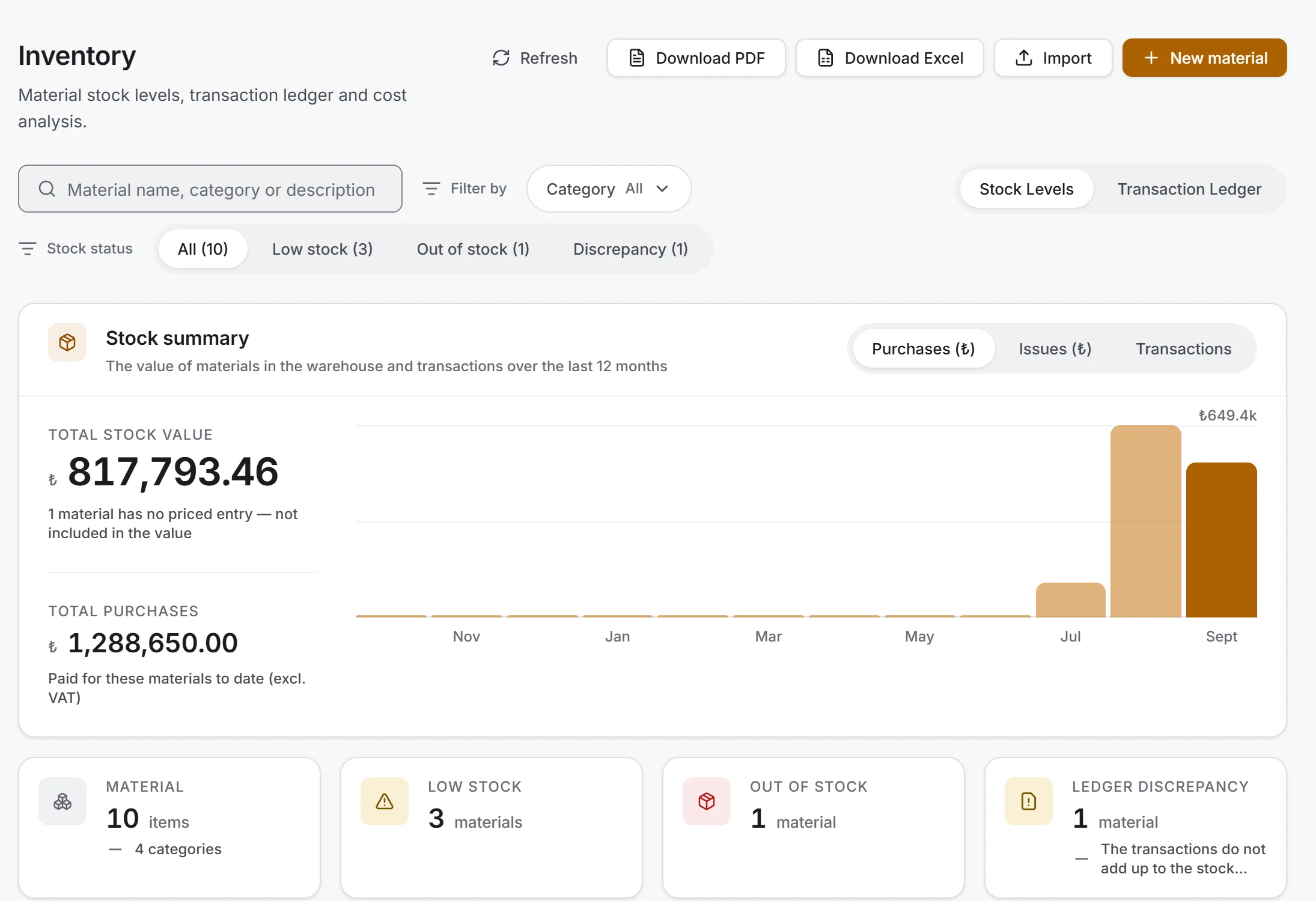
The Inventory screen on Windows: stock summary with a twelve-month chart, and counters for materials, low stock, out of stock and ledger discrepancies

Screen taken as-is from the Windows app; data belongs to a sample project.

01 Status

What am I waiting for, and what is in the store?

  • 01

    What arrived, what is left: every shipment card shows expected, received and remaining quantities with a percentage; overdue shipments are flagged in the report.

  • 02

    What is in stock and what it is worth: quantity and stock value per material.

  • 03

    What is running low: a material with a reorder point is marked in the list and counted in the summary once it falls to that level.

  • 04

    Who quoted what: an order's quotes side by side, with approved, pending and rejected ones apart.

02 Step by step

How it works

  1. 01

    Request and quotes.

    The site's need is entered as a material request; the buyer converts it into an order. A request-for-quote document without prices is prepared for suppliers (PDF, or email text to copy; the app does not send email). Quotes are entered and compared.

  2. 02

    Approval.

    Approving a quote rejects the other pending quotes, moves the order to Approved and opens the shipment card in Deliveries; a multi-item order opens one card per item. If an administrator has set an approval threshold, only the company administrator can approve quotes above it. A purchase order goes to the supplier.

  3. 03

    Receiving.

    As goods arrive, a delivery is entered on the card: quantity, delivery ticket number, document and receiver. If everything came as ordered, Receive remaining records it in one step. On the phone the receiver signs inside the form with a finger.

  4. 04

    Rejection.

    The part not accepted goes into Rejected / damaged with quantity, reason and photos. Rejected goods do not enter stock or the account; a replacement is entered as a new delivery.

  5. 05

    In the store.

    Site issues, count adjustments, transfers to another project and transfers between stores are kept here. During a stock count, barcoded materials are scanned with the phone's camera; differences become Count adjustment entries on their own.

03 Delivery

One delivery, three ledgers

A delivery is posted in the same step to the shipment card, to stock and to the supplier's account; the delivered column in Order Management changes too. Orders and quotes are not money movements; money moves when goods are received. Site issues, counts and transfers do not touch the account either. A card with no unit price still adds stock on delivery but writes no account line.

Stock is valued by one of three methods: weighted average, moving weighted average or FIFO (first in, first out). The administrator chooses it in Settings; Financials, the cost report and accounts are not affected by the choice.

04 Exports

Exports

01

Goods receipt note (PDF)

A4 portrait; supplier and receiver, expected / received / remaining / status, a lot table (date, delivery ticket, accepted quantity, unit price, amount; any rejected quantity and reason; the receiver's name and, if signed on the phone, the signature), a note number that never changes and two signature boxes. Amounts are read including tax.

02

Purchase order (PDF)

with the company logo and address and the approved quote's prices.

03

Request for quote (PDF)

items without prices, with the due date and delivery address.

04

Deliveries report (Excel)

two sheets. Shipments answers "what am I waiting for", Deliveries answers "what came in": a month's goods receipts with ticket numbers and amounts in one place.

05

Stock levels and transaction ledger

Excel and PDF, following the view and filters on screen.

In Excel the header row is frozen, filters are on, dates and numbers are real cell values, and the file states the filter it was taken with. Quantity columns are not summed, because tonnes and pieces sit together in one project.

05 Safeguards

Safeguards

  • 01

    Delivering more than expected is not blocked, it is flagged: a warning in the form, an Over-delivery badge in the list and a note on the receipt.

  • 02

    The received quantity is calculated from the lots, so two people receiving the same shipment at once do not overwrite each other.

  • 03

    If writing to the account ledger fails, the delivery is still saved and the screen says so.

  • 04

    Issuing more than the stock on hand raises a warning and suggests a count adjustment.

06 Connections

How it connects

Quotes, shipment cards and purchases add up per firm in Suppliers. When an invoice in Accounts is linked to deliveries, Deliveries compares order, delivery and invoice side by side. Financials shows material purchases and the open commitment of orders not yet received. Your existing material list imports from an Excel template; the preview counts conflicts, duplicates and invalid rows, and nothing is created until you confirm.

07 On the phone

On the phone

Inventory, Order Management and Deliveries work in the Windows, iOS and Android apps; deliveries entered on either side look the same on the other. The receiver's signature is taken on the phone and read on the computer. Rejection photos can be taken with the phone's camera.

08 Free plan

On the free plan

All three modules are included in the free plan, with no limits specific to them. Delivery tickets and rejection photos are attached to the record itself; Files, the separate document archive, comes with a subscription.

09 FAQ

Frequently asked

Where do I attach the delivery ticket?

To the delivery as a document; its number shows on the lot, the receipt note and in Excel.

What about goods with no order?

Open a manual shipment in Deliveries: small purchases, goods from another site and so on.

Can the receiver sign on delivery?

Yes, optionally, on the phone. The signature is printed on the goods receipt note.

How do I record damaged goods?

In the Rejected / damaged section of the receipt form, with quantity, reason and photos. Only the accepted quantity enters stock and the account.

How do I enter stock already in the store?

Enter the quantity on hand as a positive count adjustment; the opening quantity goes into both stock and the ledger.

Can I import my material list from Excel?

Yes, with the material template and a preview.

Place your next order through Sitabula. One project is free, with no time limit.