
01
Monthly register
person × day grid, A4 landscape, firm by firm; day totals and hours at the end of each row; two signature boxes at the end. The Excel file has the same layout.

The Sitabula Timesheets module keeps the project's workforce and the number of days each person worked every month. Who works under which subcontractor, when they started and left, and how many days they worked this month all sit in the same list. At month end you export the monthly register to PDF or Excel and take it for signature.
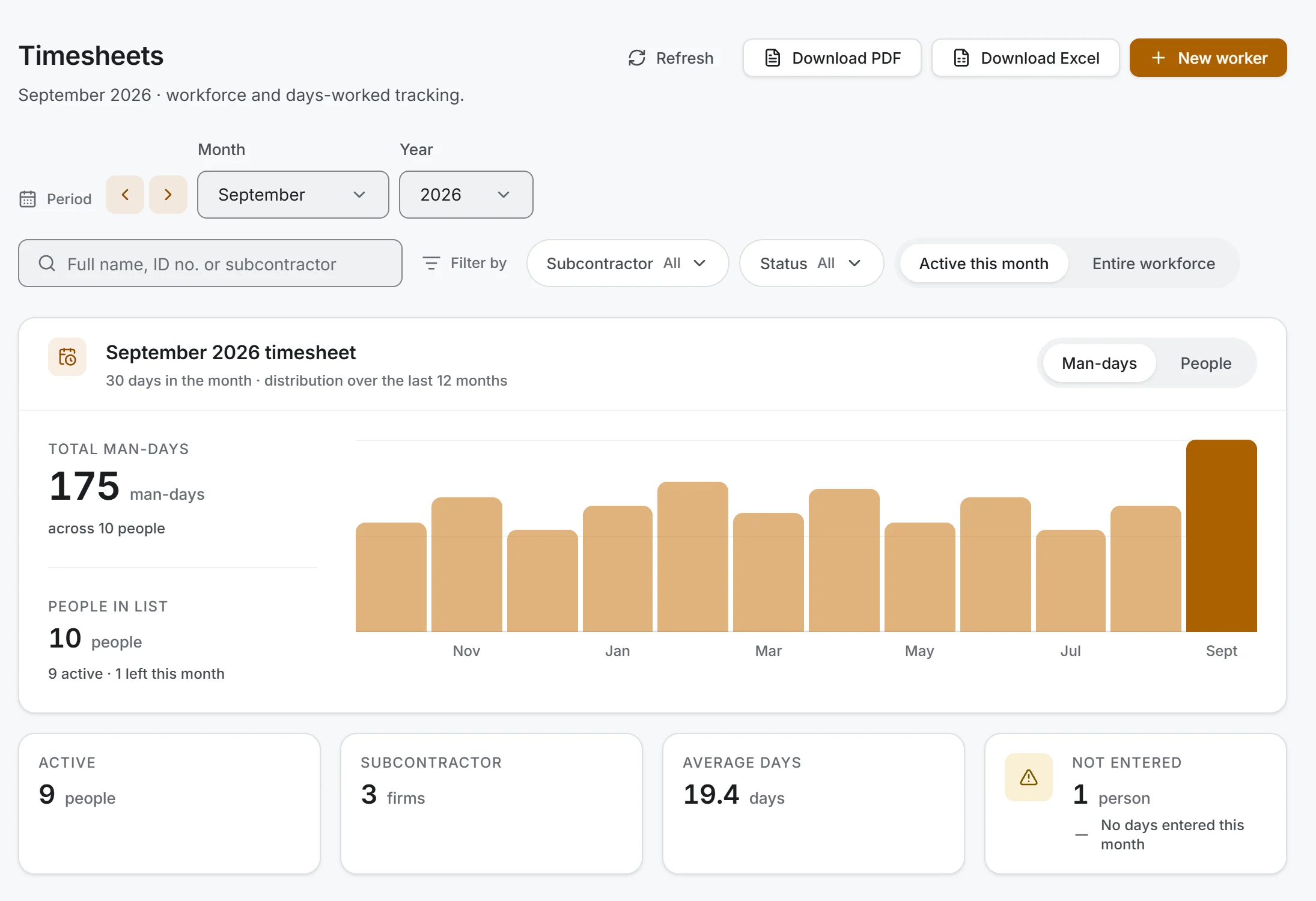
Screen taken as-is from the Windows app; data belongs to a sample project.
Total man-days and the headcount at the top, with a twelve-month chart beside them.
Subcontractor breakdown: where the month's man-days went, with headcount and share for each firm.
Workforce movement: who started and who left this month, by name and date.
Not entered counter: an empty cell means "not entered yet", 0 means "did not work this month", so you can see whether the month is complete.
Name, subcontractor and start date are enough; the ID number is optional. With no end date the person counts as active.
Enter each person's days worked; Enter and the arrow keys take you down the whole list without touching the mouse.
"All days of the month" or "Weekdays" applies to the visible rows; weekends follow the company setting. Filter by one subcontractor first and only that firm is filled.
Only changed rows are sent; if you try to change month with unsaved edits, the app stops you.
Past months stay as they were. Someone who comes back is added as a new period with "Rehire".
person × day grid, A4 landscape, firm by firm; day totals and hours at the end of each row; two signature boxes at the end. The Excel file has the same layout.
name, ID number, subcontractor, start and end dates, status and days worked. In Excel the header row is frozen, filters are on and dates are real date cells.
visible only to users with Finance permission; rate, days, hours and amount per person. The register and the summary carry no rates.
Exports follow the list on screen: the selected month and filters are what goes into the file. Exporting needs no edit permission.
The same ID number cannot be entered twice in the same project for overlapping periods; the app names the conflicting person.
If the same person exceeds 1 day in total across projects on the same day, a warning appears in the list.
Without internet, the days you typed stay on screen; press Save when the connection is back.
The subcontractor list comes from Subcontractors. Daily headcount is kept separately in the Daily Report; timesheets hold the monthly total. For firms marked as your own crew, labour in the cost report matches that month's labour total in Financials.
Timesheets is included in the free plan. The free plan allows up to 3 subcontractors per project, so the workforce sits under those three firms.
Yes; the monthly register and the staff summary export to Excel and PDF.
Enter an end date. Deleting removes all of that person's past timesheets; delete only records opened by mistake.
No. If entered, it can be a national ID, passport or foreign ID number, up to 20 characters.
Yes; timesheets work in the Windows, iOS and Android apps.
Yes. Exporting is a read action.